Image To PDF
Are you looking for the best online image to pdf converter free tool? At Tools-glide we provide an tool that not just convert your JPG, PNG, JPEG, GIF or WEBP img2pdf format, but it also help to merge multiple pictures into pdf without watermark. You can making pdf file from images free online without login or installing any software on our device. Try now to explore ‘how our tool can help to turn a picture into a pdf online in seconds?’
Share on Social Media:
Image to PDF Converter Free: Easily Convert and Merge Multiple Images Online
Have you ever needed to convert an image into a PDF but didn't have the right tools or software? Whether you're working with a single picture or turning multiple images into high-resolution documents can be a simple and quick task with the right tool.
With our image to PDF converter free tool, you can easily change your image format into high-resolution PDF without installing any software. It's a free online image converter that works with multiple file types like jpeg, PNG, jpg, bmp, and gif. You can also merge your multiple images into a single PDF to keep everything in one convenient document. Simply upload your image file, and you’ll have a PDF (portable document format) ready in just a few clicks!
What is Tools-Glide Images to PDF Converter & Why Do You Need It?
Do you find yourself struggling to manage multiple pictures or needing to convert image to PDF free tool for a regular basis? Whether it is for office, college, or sorting out your files, the conversion of images into PDFs should be very smooth.
Many online picture format converters are available, but they offer limited functionality. They either give an output of the lowest quality or have complex processing steps or an interface with awkward operational procedures. It is really annoying, especially when you need to create PDF file from images on an urgent base.
To solve these issues, we introduce our online web-based free image converter tool that helps to change any picture file type, whether jpeg, PNG, jpg, bmp, or gif to PDF within seconds. Our tool effortlessly enables you to convert photo to high resolution PDF files within just a few steps. It's ideal for users who want to turn image into PDFs without using any complex software or watching unnecessary ads to download your file.
It’s not just online image converter; rather it gives you the power to create PDF document from images to ensure that the output quality meets your needs. So, don’t waste your time or money. Try our tool and make your life easier by simplifying your workflow.
Key Features of Our Free Online Picture Converter Tool
When it comes to converting images into PDFs online, there are multiple different types of tools available in the market. At tools-glide, we offer a range of key features in our free online picture converter that makes it better than all other free and paid tools. Here is,
What makes our tool stand out?
- No Software Installation Required: Simply visit the website, upload your image, and get your PDF conversion done within seconds.
- Multiple File Formats Supported: Whether it’s a PNG, JPG, BMP, or GIF, our image file type converter supports all common formats.
- High-Quality Conversion: You don't need to worry about losing quality during the conversion. Our tool preserves the quality of the images while converting them to portable documents.
- Combine Images into One PDF: Need to combine several images into one PDF? No problem! You can use our tool to merge images into PDFs, creating a single, neatly formatted document for easy sharing and storage.
- Quick & Free: The tool is fast and completely free to use for images under 10MB. This makes it a perfect photo file converter for anyone needing a quick solution without spending money.
How to Use Our Tool to Create PDF from Images – Step-by-Step
Using our tool to change your images into a portable document is easy and doesn't require any advanced steps at all! Below are steps to convert one or multiple images to get the highest-quality PDF in seconds.
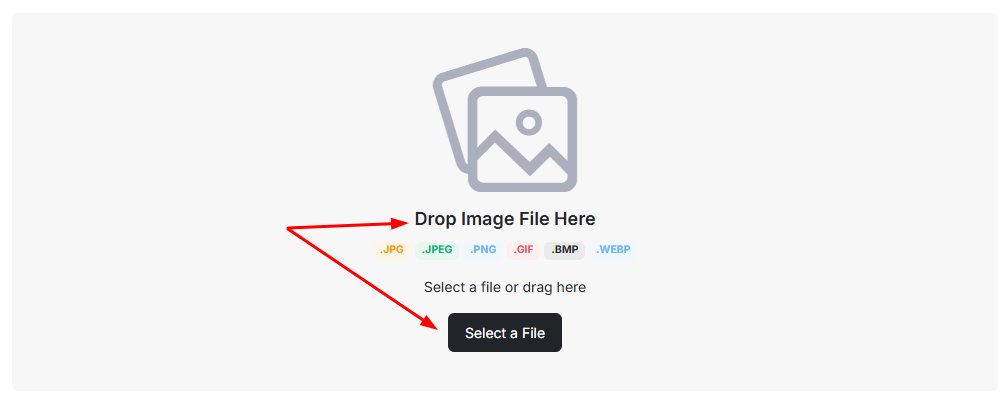
Step 1. Upload Your Image(s)
Visit our images to PDF converter online tool and upload your picture(s). The tool offers types of multiple image format conversion including (but limited to) JPEG, PNG, WEBP, and GIF as well as you can also convert bmp to PDF without any problem.
Step 2. Adjust and Order Your Files
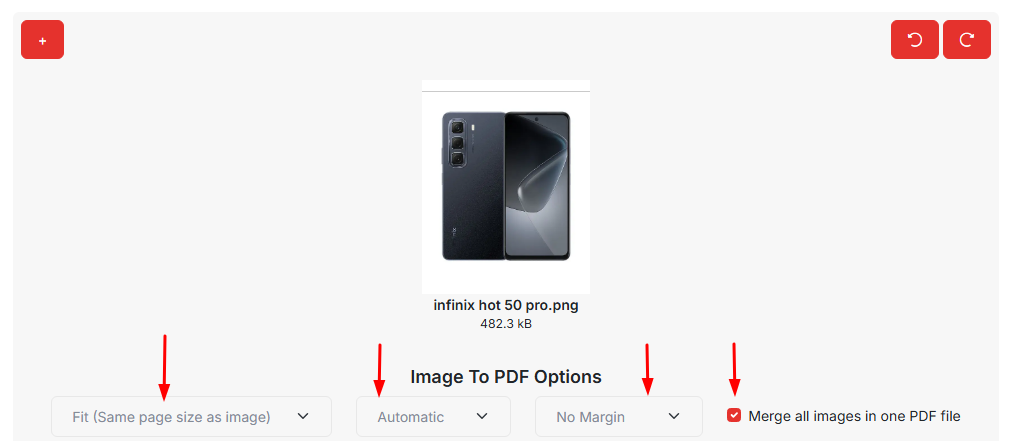
After you upload your images, you can arrange and adjust them. You can set the pre-output document layout. This way, you can tweak things like margins or orientation. In short, you'll be able to convert img to PDF with the settings you'd like.
Step 3. Click to Create PDF Document from Images
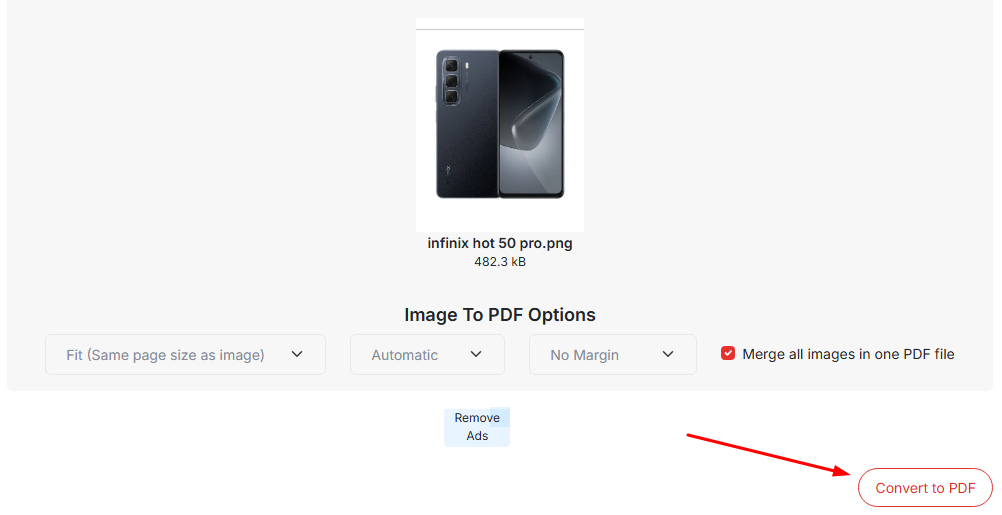
Once you have adjusted your document, press the "Convert" button. Our online image format converter will do the work without losing any document quality.
Step 4. Download and Save Image as PDF
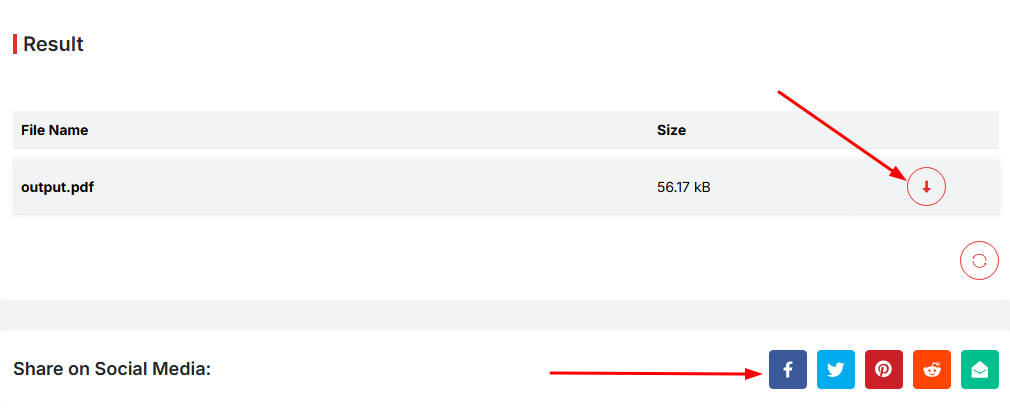
After your image is converted, our free online photo file converter will give you both a download and share button. That helps you share or save your high-quality PDF file from images without any additional steps.
Why Choose Tools-Glide Over Other Picture to PDF Converter Tools?
Disappointed with other online picture to PDF converter solutions that fail to deliver that meet your expectations? This is where Tools-Glide separates itself. Unlike other tools, our picture format converter provides high-quality conversion results. Here are the advantages of using our free image converter:
- No Hidden Costs: Using our img2pdf converter tool, you can convert up to 10MB size pictures daily without logging or purchasing a premium plan.
- Fast and Easy to Use: Designed for speed, change your files format within seconds. Our image file format converter tool is the best option if you are simply looking for something easy-to-use and fast providing results.
- Flexible Layout Options: We have several layout options here, and you can adjust margin size, page size, and the orientation of your document.
- No Sign-Up and Install Required: You can start using our tool in seconds, which doesn't require anything to sign up or install before using it. It’s that easy; just a few clicks, and you’ll get your conversions.
- Works on All Devices: Most users are worried about "how to convert picture to PDF on iPhone or any other devices?" We are excited to inform you that we built an advanced high resolution image converter that works seamlessly across all devices and browsers.
- No Technical Skills Needed: You can easily convert pic to PDF by following simple steps without having technical knowledge.
- Safe and Secure: Once your images are converted, they will get deleted, so your images are safe and your privacy is assured! You can turn images into PDFs without worrying about data retention or privacy!
Benefits of Making PDF File from Images Using Our Online Image Format Converter
Have you faced challenges in sending multiple image files or uploading documents online in PDF format? Our Picture to PDF Converter tool not only takes the work out of formatting file documents.It can help you with your workflow and relieve you of an unnecessary headache!
Real Benefits You'll Get:
- Time Savings: You can convert pic to PDF in a matter of seconds - and not spend any time watching ads or signing up to convert!
- Professional Look: If you're applying for an employer, submitting work for class, or whether if it's for displaying visual content, our tool provides you with single, well-polished PDF looks that far more presentable than multiple random image files you have attached separately.
- Ready To Print Output: When you print a PDF document, there are no surprises in your formatting. Whether you are looking for a JPG, WEBP or PNG to PDF converter, or even if you ever need to use 'convert gif file to PDF,' you can have it all by using our tool and take print.
- Space Optimized: Merging images into PDFs also saves space and makes the distribution smaller, especially when sending documents via email or uploading files to online portals.
Who Can Use This Tool to Turn Image into PDF?
Have you ever asked yourself who requires an online web-based tool to convert image to pdf for free? The quick answer is — almost everyone. Students, Marketers, designers, and all general users like you managing files and documents can benefit from converting images into a neat, portable document. Here’s how different types of users change your file onlinetopdf by using our tool:
- Students and Teachers: Do you need to upload assignments or combine notes into an assignment? This tool will help you instantly turn images into PDF format.
- Small Business Owners: They can use our image to PDF converter for free to transfer your email receipts or copies of invoices into one shareable, high-resolution, portable document format.
- Freelancers and Professionals: Designers, marketers, or writers may need to share images in a more organized manner. Our photo file converter tool helps them to convert image to high resolution file that can be easily shared anywhere on Social Media.
- For Anyone Else Trying to Go Paperless: Do you have paper clutter? You can scan image to text online and then convert it into PDF Format. No more losing documents or trying to find messy folders.
Tools Glide vs. Other Free Online Image File Type Converter – What Makes Us the Best?
There are tons of image file type converters out there. So, what makes Tools Glide stand out? Let’s break it down. Most tools promise fast conversion, but they come with limitations — like providing watermarks PDF output, showing pop-ups, slow uploads, or forced sign-ups. We designed our free img2pdf tool to fix all that. Here’s a quick comparison to show how Tools-Glide photo to PDF converter beats the online competition:
Features | Tools Glide | Other Free Tools |
| No sign-up needed | Yes | ❌ Often required |
| Ad-free interface | Yes | ❌ Full of distractions |
| Supports multiple image formats | JPG, GIF, PNG, WEBP, | ❌ Limited formats |
| Combine multiple images into one PDF | Yes | ❌ Not always available |
| Works on all devices & browsers | Yes | ❌ Limited compatibility |
| Download PDF instantly | No waiting | ❌ Delays or email links |
| High-quality image preservation | Crystal-clear output | ❌ Blurry or compressed |
| Premium upgrade for large files | Transparent pricing | ❌ Hidden costs or ads |
Frequently Asked Questions (FAQs)
Q: Is it safe to use your tool to convert image to PDF online?
Yes, your privacy is our priority. We never store your files. All images are deleted after conversion.
Q: Is you provide any other tool for different image to other format conversion?
Yes! Tools-Glide offers multiple free online tools to convert different image files into another format. Here are some of our tools are given below:
Q: Can I merge multiple image formats into one PDF file?
Yes, our tool allows you to combine JPG, PNG, WEBP, and other formats into a single PDF easily.
Q4: Does the tool maintain the quality of images when converting to PDF?
Absolutely! The conversion keeps the quality intact; we always take care to convert image to high resolution so your document is perfect for printing and sharing.
Q5: How do I convert a screenshot into a PDF?
Just upload your screenshot in the supported format “jpg, png, webp, gif and bmp” and click on the convert button to get a high-quality PDF in seconds.
Start Using Our Free Image to PDF Converter Tool Now!
Are you tired of searching for a trustworthy method to convert image to PDF free without any trouble? Using Tools Glide, it is very simple to create PDF from images in seconds. There’s no signup, no installation, and no annoying limits. Regardless of your image format, whether you want an online web-based JPG to PDF converter or want to convert GIF, WEBP, or PNG, this tool covers all of your images to PDF needs in one location.
So, don’t try to spend your time searching for a paid or complicated tool to convert img to PDF for work, school, or personal use. Test out our image to PDF converter for free now and obtain your high-quality converted PDF in seconds or a few steps.